
Security cameras are one of the best tools for keeping the things you care about safe. But figuring out how many you actually need? That can feel a bit overwhelming. You want to make sure every important area is covered, without going overboard or leaving any blind spots.
Whether you’re securing your home, your business, or both, it’s all about finding that sweet spot between safety and budget. Instead of guessing or going with a random number, it helps to take a more thoughtful approach. Take a little time to plan out your coverage, it’s worth it. That way, you avoid the hassle of blind spots or spending money on cameras you don’t need.
Working with a professional home security camera installation service can also make a big difference. Let’s walk through how to figure out the right number of cameras for your specific situation.
Property Factors That Impact Camera Needs
When it comes to video surveillance, there’s no one-size-fits-all solution. Every property is different; your layout, the size of the space, how it’s used, and what you’re trying to protect all play a role in figuring out what you need. That’s why starting with a basic needs assessment is a smart move before buying any equipment. One of the biggest factors is the size of your property. A large warehouse or a big home will naturally need more cameras than a small apartment or a cozy storefront. You’ll also want to think about all your entry points. Doors, windows, and any other access routes should be covered. Outdoor areas often need extra attention too, especially if theft or vandalism is a concern. Then there’s the question of detail. Are you just keeping an eye on things in general, or do you need sharp, close-up footage for identifying people or items? High-risk areas where you store cash or valuable inventory might need multiple camera angles to avoid blind spots. And finally, consider the environment. If you’ve got dimly lit areas, you’ll want cameras with night vision. For outdoor spots, weatherproof cameras are a must. All these little details help determine not just what kind of cameras you need, but how many.How Many Cameras Do You Need For Your Home?
The goal isn’t to overdo it, but to plan carefully so you’re covering the right spots without making your home feel like a fortress Professionals recommend installing cameras in these key areas:- Main Entry Points: Front, back, and side doors are the most common points of entry for intruders.
- Common Living Spaces: Monitoring your living room, kitchen, and hallways to help track movement within the home.
- Driveways and Garages: These areas often house vehicles and other equipment that are valuable targets.
- Backyards and Perimeter Fencing: Installing outdoor cameras can deter trespassers before they even reach the house.
How Many Cameras Do You Need for Your Business?
Securing a business comes with its own set of challenges. You’re not just keeping an eye on the property, you’re also looking out for the people and the day-to-day operations that keep things running. Since every business is different, your camera setup might need to be a bit more tailored than what you’d use at home. To properly secure a business, you’ll want to monitor areas such as:- Main Entrances and Exits: Control access points to help track customer and employee flow.
- Sales Floors or Customer Areas: Keep an eye on public spaces to reduce shoplifting and fraud.
- Employee-only Areas: Monitor break rooms, storage spaces, and supply closets to help prevent internal theft.
- Cash Registers and Points of Sale: These high-value areas need dedicated coverage.
- Parking Lots or Garages: Protect customers, employees, and their vehicles.
How Camera Features Impact the Number You Need
Not all cameras are created equal. Some have a wider field of view, meaning one camera can cover a larger area, which might help reduce how many you need. Quantity does not equal quality, though. High-def cameras capture more detail, making them perfect for spots where you need to see things clearly. If you’re installing cameras outside, motion detection is a great feature. It helps you only record when there’s activity, saving storage and making monitoring more efficient. Some of the newer models can even tell the difference between people and other moving objects, which makes managing alerts a lot easier. Another option to consider is the addition of pan-tilt-zoom (PTZ) cameras. These cameras can rotate and zoom in, covering a bigger area, so you might not need as many static cameras. But remember, camera placement is just as important as how many you have. Even with the best cameras, poor placement can leave you with blind spots.How To Plan Your Security Camera Layout
Sketch a rough layout of your property. Start by marking all critical areas: entry points, high-value zones, and blind spots. Then overlay where you would place cameras. When planning your layout:- Avoid Obstacles: Trees, furniture, and equipment can block views.
- Optimize Lighting: Position cameras to take advantage of available light, or choose night-vision-equipped models for darker areas.
- Cover Key Angles: Position cameras to eliminate blind spots while keeping coverage overlap to a minimum.
Balance Your Budget vs Security Needs
Cost is always a factor. It’s tempting to try to save money by cutting down on cameras, but this can lead to vulnerabilities that cost you more in the long run. Instead, first prioritize the areas that pose the highest risk. For example, if you must choose between covering your main entrance and a rarely used back door, focus on the main entrance. You can always expand your system later as your budget allows.Make the Right Choice For Your Home or Business
Figuring out how many security cameras you need isn’t just about putting up as many as you can afford. It’s about making a plan that covers the right areas and choosing the right technology for your specific needs. The goal is to create a system that offers solid protection without feeling overwhelming. By taking the time to assess your space and its risks, you’ll end up with a setup you can trust for the long run. If you’re ready to move forward, working with a professional security camera installation company can give you confidence that every part of your property is properly covered.Video
Infographic
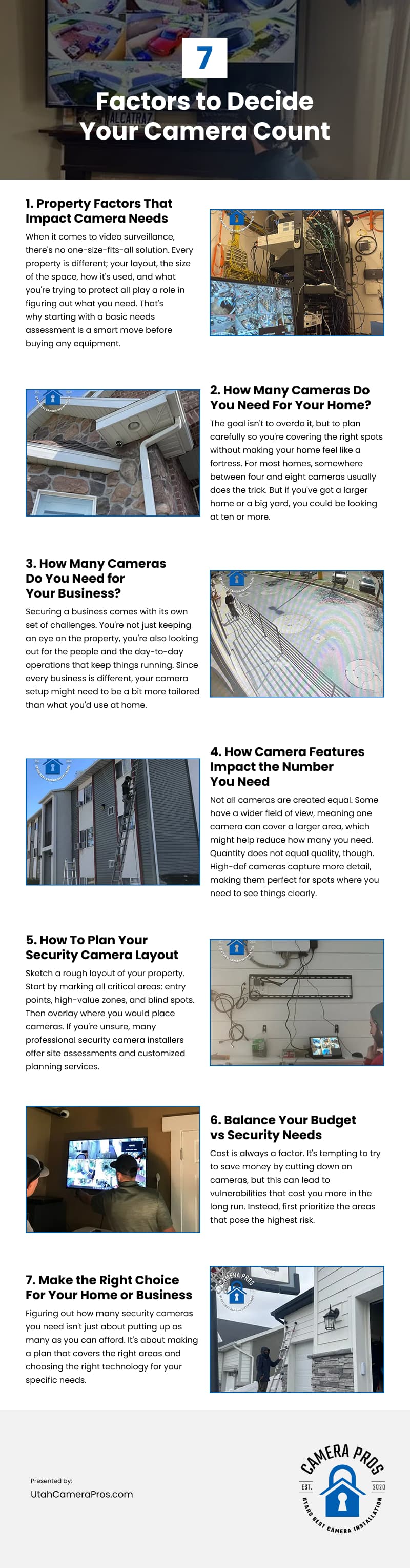
Figuring out how many security cameras you need for your home or business can feel overwhelming—but a strategic plan makes all the difference. This infographic outlines key factors to help you determine the right camera count.